Vector by Sitara Infotech

Print once. Edit forever.

We tracked one project launch where the same master plan was printed and revised forty-seven times in a quarter. We built Vector after that. A customized map tool for real estate developers, investors, and brokers. Visualize digitally. Revise a thousand times. Print only when there is a real reason to.

Python backend, React frontend, PostgreSQL, Docker-deployed. ยท Built for chaos. Built for scale. Production grade.

Live UI - Demo data Vector real estate map tool with fully customizable plot buckets - investor-wise, buyer-wise, status-wise
Built for the way your team actually works.

If any of these sound familiar, Vector replaces the loop you're stuck in.

For the Developer

Print once, not forty-seven times.

Stakeholder meeting Monday. Allotment changes Tuesday. Phase boundary moves Wednesday. Today that means a new print run, marker pens, scan, email. We tracked one launch that hit forty-seven prints of the same plan in a quarter. With Vector, the master plan stays digital. Edit. Save. Send a link. The print bill drops to almost zero.

For the Broker

Filter the map for one buyer.

A family wants a 10-marla corner plot, park-facing, in your price band. Today you flip through binders, mark up a paper map, take a photo on WhatsApp. With Vector, filter the map to matching plots, hide the rest, export a clean proposal PDF with the buyer's name on it.

For Operations

Excel and map stop drifting.

Your master plan PDF lives in one place. Your inventory Excel lives in another. Allotments change in one, not the other. Reconciliation eats a week. Vector imports the Excel, links each row to its plot on the map, and flags mismatches. One source of truth.

For the Director

See the project as a heatmap.

Open the map. See at a glance which investor holds which block, which buyer owns which plot, where the corner premiums sit, what is still unallotted. No reports to wait for. No "let me check with the sales team". The shape of the project is visible the moment you load the page.

Categorize Any Way You Want

Your inventory. Your buckets.

Vector does not lock you into a fixed list. Categorize the way your business actually runs:

  • Investor-wise: allot the same project across 50 investors, each one a separate bucket on the map.
  • Customer-wise: every buyer gets their own colour, every plot they own paints to it.
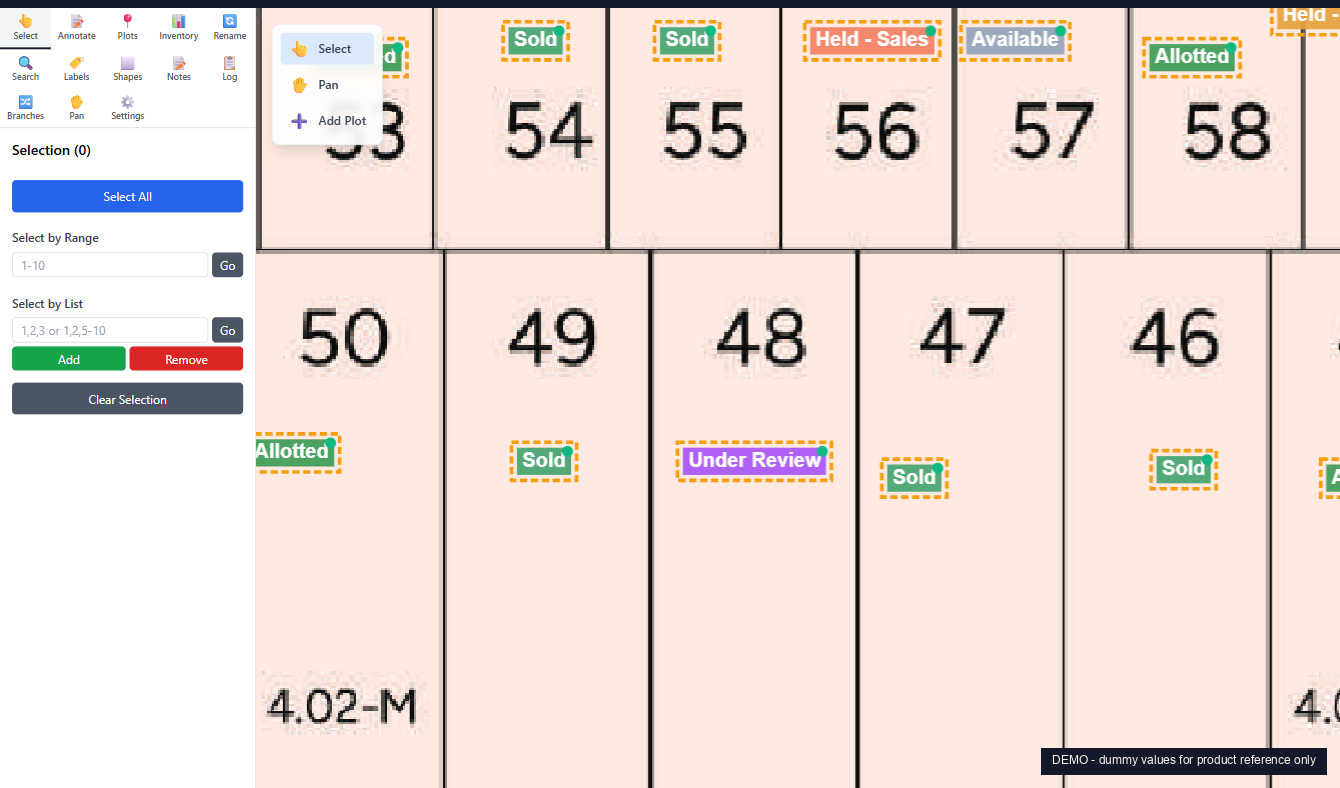
  • Status-wise: classic Sold / Allotted / Held / Reserved / Available, the way the demo above is set up.
  • Phase-wise, price-band-wise, size-wise, broker-wise: whatever taxonomy your team works with.

The map paints to whichever buckets you create. The legend pins to the corner and updates live as your team works. Switch between bucket views without rebuilding anything.

Plot grid painted by custom buckets (status example shown - the same map can be repainted by investor or buyer)
Demo project. Dummy values for product reference only.
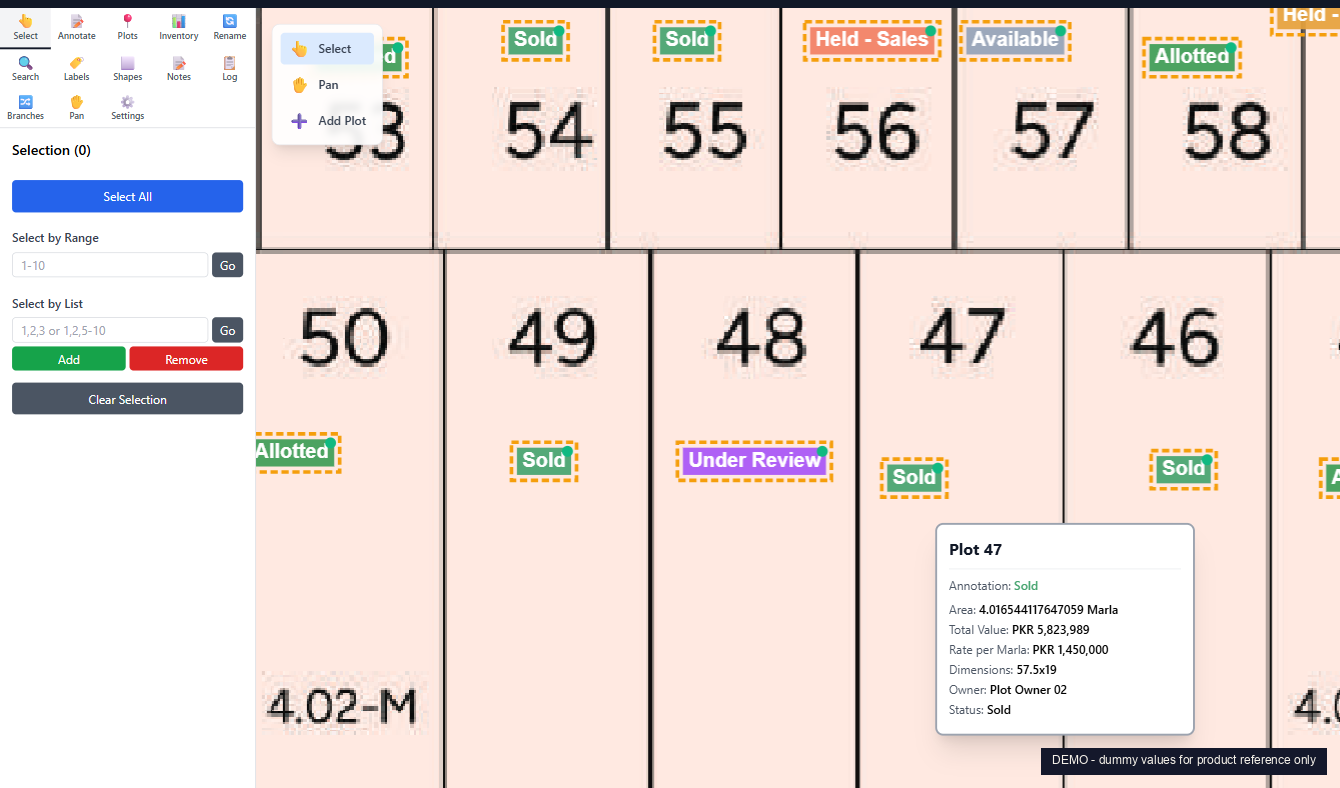
Instant Plot Details

Hover any plot. See everything.

Marla, dimensions, rate per marla, total value, owner, status, notes. All of it in a floating card the moment your cursor lands on the plot. No clicks, no modals, no "let me pull up the spreadsheet".

  • Reads directly from your linked Excel inventory.
  • Updates when the Excel updates. No re-import needed for value changes.
  • Colour-coded badge inside the card matches whichever bucket the plot belongs to.
  • Click for the full draggable details window with the plot's history.
Hover popup over Plot 47 showing area, total value PKR 5,823,989, rate per marla PKR 1,450,000, dimensions, owner, status
Demo project. Dummy values for product reference only.
Bulk Selection

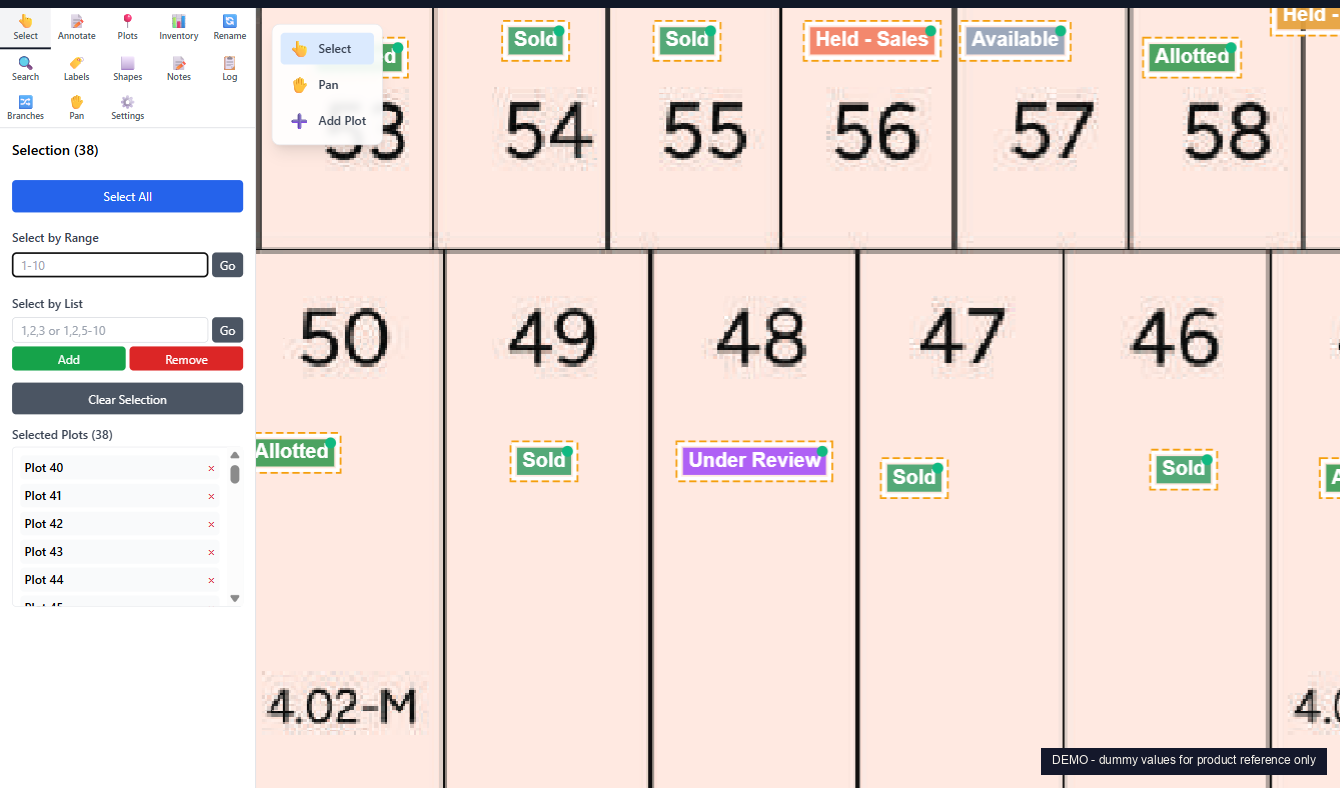
Select 40 plots. One line of input.

Pick plots by range (40-77), by list (1, 5, 12-18, 42), or by clicking. The sidebar shows the running total: how many selected, total marla, total value. Build a proposal block, mark a phase for hold, or export the selection to Excel.

  • Range and list selectors that handle thousands of plots.
  • Add or remove plots from the current selection without starting over.
  • Selection feeds straight into the Proposal PDF exporter.
  • Rotate selected plots 90 degrees in one click for L-shaped corners.
Sidebar showing 38 plots selected by range 40-77 with selected plots list
Demo project. Dummy values for product reference only.
Custom Proposal PDFs

One buyer. One PDF. One click.

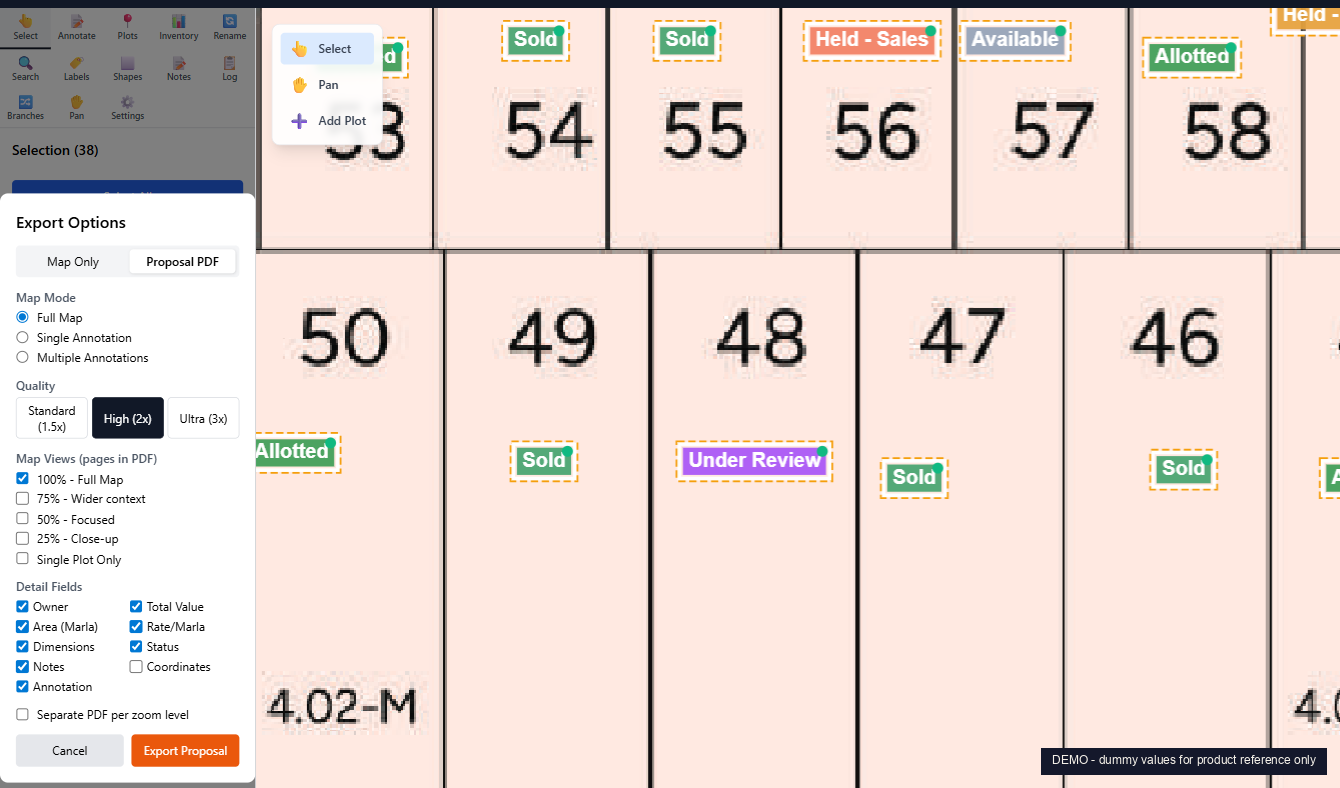
The reason developers and brokers come to Vector. Pick the plots the buyer is interested in. Choose what fields to include. Pick the zoom levels (full map, focused block, close-up, single plot). Generate. The PDF lands in your downloads ready to send on WhatsApp or email.

  • Full Map / 75% / 50% / 25% / Close-up zoom presets, in one PDF.
  • Toggle each field: Owner, Marla, Total Value, Rate per Marla, Dimensions, Status, Notes.
  • Standard, High DPI, or Ultra DPI output for print-grade resolution.
  • Single-plot PDF for granular proposals. Multi-plot for block-wide deals.
Proposal PDF export configurator with Map Mode, Quality, Map Views (pages to PDF), and Detail Fields options
Demo project. Dummy values for product reference only.
Excel Inventory Import

Your inventory sheet, linked to the map.

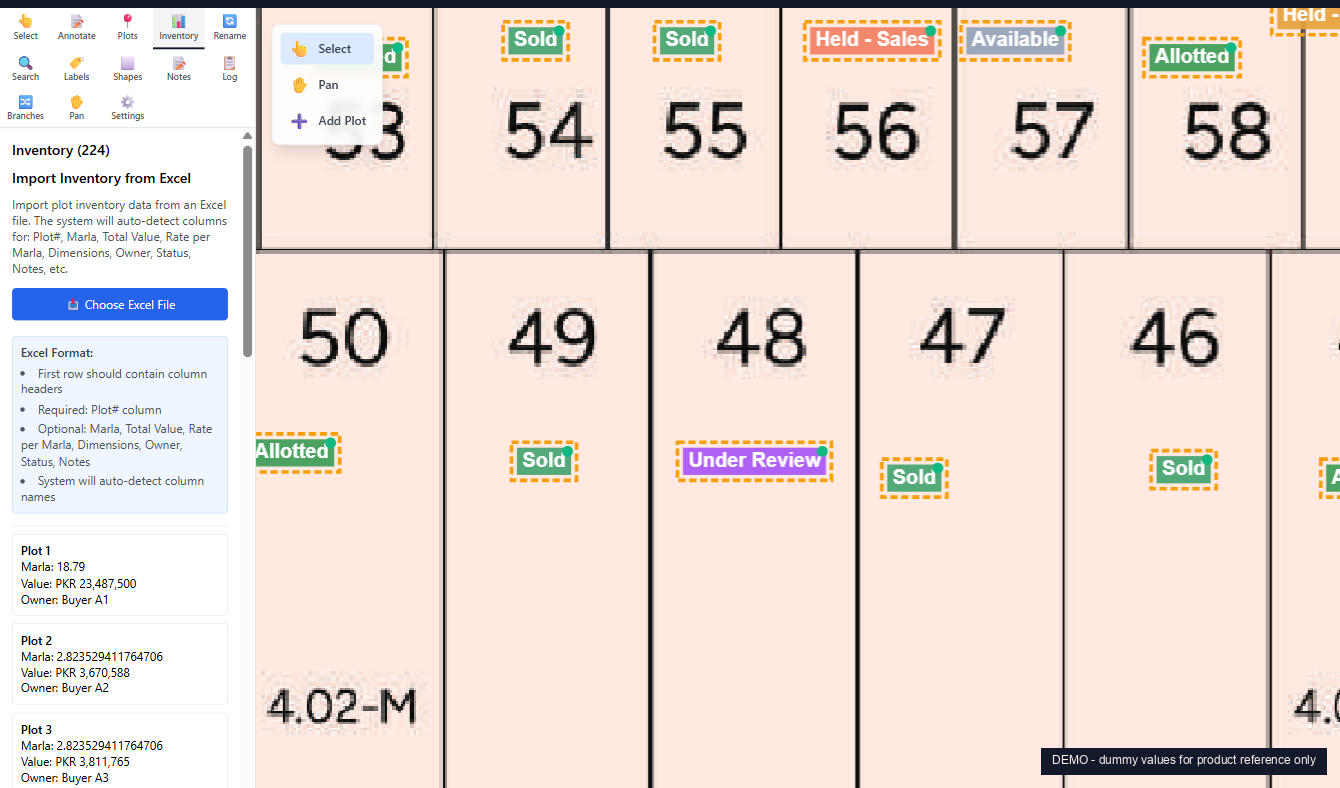
Upload your existing Excel inventory. Vector auto-detects the columns (plot number, marla, rate, dimensions, owner, status, notes), matches each row to the plot on the map, and links them. From then on, every change in the inventory shows up on the map, and every hover shows the inventory record.

  • Auto-detects column headers. No naming convention to learn.
  • Required: plot number. Optional: everything else.
  • Re-import any time. Vector handles deltas, not full overwrites.
  • Reconciliation panel flags map plots without inventory, and inventory rows without map plots.
Excel inventory import panel showing format spec and 3 sample rows with marla, value, owner
Demo project. Dummy values for product reference only.
Thirteen panels. One workflow.

Every panel is built for the way real estate teams work. Click through any one in a live demo and see the full data flow.

Select

Range, list, click. Track total marla and total value of the selection live.

Annotate

Fully custom buckets with colours. By investor, by buyer, by status, by phase. Drag plots between buckets.

Plots

Master list of every plot. Search, sort, jump-to on the map.

Inventory

Excel import, auto-detect columns, re-import deltas, reconcile mismatches.

Rename

Mass rename plot numbers when blocks get re-numbered after a planning change.

Search

Find a plot by number, owner, status, value range, marla range, or notes.

Labels

Add text labels for road names, blocks, amenities, phase markers.

Shapes

Draw rectangles, ellipses, polylines over the map for amenities or proposed expansions.

Notes

Free-text notes attached to plots or to the whole project. Versioned.

Log

Every change is logged: who, when, what. Filter by user or action.

Branches

Master plan plus parallel branches: Investor Block, Phase 2 Proposal, Corner Premium.

Pan / Zoom

Smooth pan and zoom. Keyboard shortcuts. Fit-to-screen one tap.

Settings

Tile rendering, plot styling, annotation defaults, deeper configuration.


A tool built for real estate, not surveyors.

AutoCAD and ESRI ArcGIS are world-class, but they're built for drafting and geospatial analysis. Vector is built for the specific way developers and brokers in Pakistan and the GCC actually work.

AutoCAD ESRI ArcGIS Vector by Sitara
Built for Drafting and design Geospatial analysis Real estate inventory and proposals
License cost USD 2,300 / user / year USD 13,000 / user / year Per-project, no per-user fees
Learning curve Months of drafting training Steep GIS expertise required Hours. Built around your existing workflow
Excel inventory link Manual export and re-import Custom scripting Native. Auto-column-detect on first import
Buyer proposal PDF Manual export, no buyer fields Custom layout work One-click. Choose plots, zoom, fields, done
Custom plot buckets Manual layer setup Symbology rules to build Define your own. Investor, buyer, status, phase, anything
Audit log None Add-on Built in. Every change, every user

Quick answers.
Who is Vector built for?

Real estate developers, brokers, and project operations teams who work with master plans, plot inventory, and buyer proposals. If your team prints the master plan, marks it up by hand, then reprints when allotments change, Vector replaces that loop.

Do I need to redraw my map from scratch?

No. Upload your existing PDF master plan. Vector reads it as the base layer, then overlays plots, annotations, shapes, and labels on top. Your original PDF stays untouched. When the architect issues an update, swap the PDF and your annotations move with it.

How does Vector handle inventory?

Upload your Excel inventory sheet. Vector auto-detects column headers (plot number, marla, rate per marla, total value, dimensions, owner, status, notes) and links each row to the matching plot on the map. From then on, every plot shows its inventory record on hover or full detail view.

What is a custom proposal PDF?

A buyer-specific filtered export. Pick the plots the buyer cares about, choose which fields to include (owner, marla, value, dimensions, status, notes), pick zoom levels (full map, focused block, single plot, close-up), and Vector generates a branded PDF ready to send on WhatsApp or email. Replaces the print, mark, scan, email cycle.

How is Vector different from AutoCAD or GIS tools?

AutoCAD is a drafting tool. ESRI ArcGIS is a geospatial platform that costs around USD 13,000 per user per year. Vector is purpose-built for real estate inventory and buyer-facing workflows. No drafting skills required. The whole tool is built around the way developers and brokers actually work: plots, status, allotments, proposals.

Can we run Vector for our specific society or project?

Yes. Vector is delivered as a custom deployment per project: your master plan, your inventory, your branding, your team accounts. Pricing is per project, not per user. Contact us via WhatsApp or the form below for a scoped quote.

Bring your master plan. Leave with a working map.
We reply within 24 hours.